Room DB란?
Room DB는 안드로이드 앱에서 SQLite 데이터베이스를 사용하기 위한 ORM(Object-Relational Mapping) 라이브러리입니다. 쉽게 말해, Room은 SQLite 데이터베이스와 앱 코드(주로 코틀린 또는 자바) 사이의 상호작용을 더 쉽고 안전하게 만들어주는 도구입니다.
Room을 사용하여 로컬 데이터베이스에 데이터 저장 | App data and files | Android Developers
Room 라이브러리를 사용하여 데이터를 유지하는 방법 알아보기
developer.android.com
Room DB는 안드로이드 앱에서 로컬 데이터베이스를 사용하기 위한 라이브러리라고 생각된다. 구조나 더 자세한 정의는 위의 공식 홈페이지를 통해 확인 바라며, 해당 포스트는 Room DB를 사용하기 위한 과정만을 정리하는 것이 주요한 목적이다.
1. 종속 항목 추가
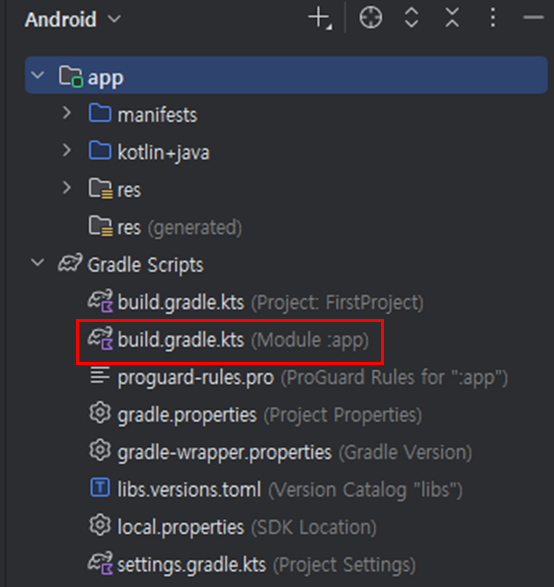
먼저 위 링크의 가이드를 따라 "앱"의 build.gradle 파일에 다음 종속 항목을 추가한다. (이때 우리 프로젝트는 Kotlin 임으로 "annotationProcessor"는 주석처리 해주었다.
dependencies {
    val room_version = "2.7.2"

    implementation("androidx.room:room-runtime:$room_version")

    // If this project uses any Kotlin source, use Kotlin Symbol Processing (KSP)
    // See Add the KSP plugin to your project
    ksp("androidx.room:room-compiler:$room_version")

    // If this project only uses Java source, use the Java annotationProcessor
    // No additional plugins are necessary
    // annotationProcessor("androidx.room:room-compiler:$room_version")

    // optional - Kotlin Extensions and Coroutines support for Room
    implementation("androidx.room:room-ktx:$room_version")

    // optional - RxJava2 support for Room
    implementation("androidx.room:room-rxjava2:$room_version")

    // optional - RxJava3 support for Room
    implementation("androidx.room:room-rxjava3:$room_version")

    // optional - Guava support for Room, including Optional and ListenableFuture
    implementation("androidx.room:room-guava:$room_version")

    // optional - Test helpers
    testImplementation("androidx.room:room-testing:$room_version")

    // optional - Paging 3 Integration
    implementation("androidx.room:room-paging:$room_version")
}
이후 실행을 해 보면 아래와 같은 에러 메시지를 확인할 수 있다.

2. Unresolved reference ksp 해결하기
kapt에서 KSP로 이전 | Android Studio | Android Developers
주석 프로세서의 사용을 kapt에서 KSP로 이전합니다.
developer.android.com
위의 내용을 확인해 보자. 먼저 최상위 build.gradle.kts 파일에서 KSP 플러그인을 선언해야 한다. 이때 프로젝트의 Kotlin 버전에 맞는 KSP 버전을 선택해야 하므로, Kotlin의 버전을 확인해 보도록 하자.
kotlinc -version버전 확인은 위의 명령어로 가능하고, 만약 실행이 되지 않는다면 환경변수에 아래 PATH를 추가해주자.
C:\Program Files\Android\Android Studio\jbr\bin
C:\Program Files\Android\Android Studio\plugins\Kotlin\kotlinc\bin
Kotlin 버전을 확인하였다면, 그에 맞는 KSP 버전을 확인해 보도록 하자.
Releases · google/ksp
Kotlin Symbol Processing API. Contribute to google/ksp development by creating an account on GitHub.
github.com
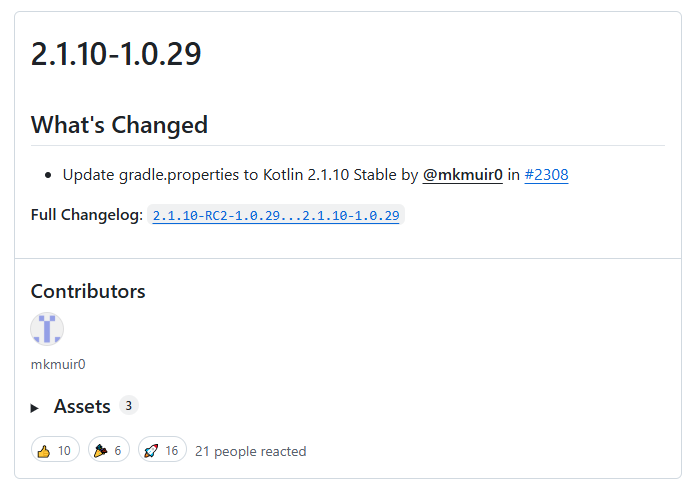
나의 Kotlin 버전과 맞는 KSP 버전을 찾았으니, "프로젝트"에 KSP 플러그인을 추가해 보자.
// Top-level build file where you can add configuration options common to all sub-projects/modules.
plugins {
    alias(libs.plugins.android.application) apply false
    alias(libs.plugins.kotlin.android) apply false
    id("com.google.devtools.ksp") version "2.1.10-1.0.29" apply false // 추가
}
이후 "앱"의 build.gradle 파일에도 KSP 사용 설정을 해주도록 하자.
plugins {
    alias(libs.plugins.android.application)
    alias(libs.plugins.kotlin.android)
    id("com.google.devtools.ksp") // 추가
}
그럼에도 불구하고, 아래와 같은 에러메시지가 지속적으로 발생하였다.

3. Gradle Sync issues 해결하기
해결 방법은 간단하다. 프로젝트의 "libs.versions.toml"파일을 확인해 보자.
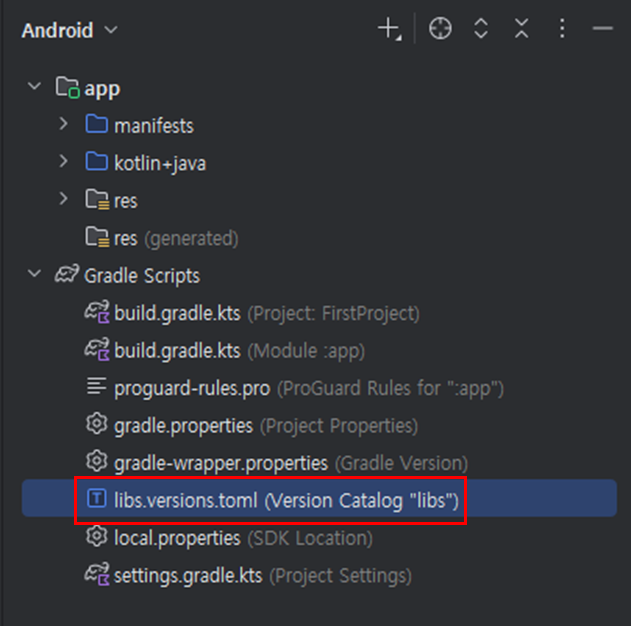

kotlin 버전이 위에서 확인했던 "2.1.10"과는 다르게 설정되어 있는 것을 확인할 수 있다. 이를 해결하기 위해 kotlin 버전을 아래와 같이 수정해 준다.
[versions]
agp = "8.12.0"
kotlin = "2.1.10" // 수정
coreKtx = "1.10.1"
junit = "4.13.2"
junitVersion = "1.1.5"
espressoCore = "3.5.1"
appcompat = "1.6.1"
material = "1.10.0"
activity = "1.8.0"
constraintlayout = "2.1.4"
이후 실행하면, 에러 없이 정상 동작을 확인 가능하다.

'[Develop] > [Android]' 카테고리의 다른 글
| [Android] 개발 시작하기 - Kotlin 반복문(for) (0) | 2025.08.22 |
|---|---|
| [Android] 개발 시작하기 - Kotlin 조건문(if) (3) | 2025.08.18 |
| [Android] 개발 시작하기 - Kotlin 배열(Array) (0) | 2025.08.16 |
| [Android] 개발 시작하기 - Kotlin 함수 (8) | 2025.08.12 |
| [Android] 개발 시작하기 - Kotlin 버튼 기능 추가 (1) | 2025.08.11 |